rook
Versions |
|
Documentation and Support |
|
Open Source Coding Standards |
|
Development Status |
|









- rook (the bird)
An intelligent and social bird that surveys vast landscapes, finds what matters, and brings it within easy reach.
- rook
Remote Operations On Klimadaten.
Rook: Smart access to climate data.
Like the bird, Rook surveys vast climate archives, finds what matters, and brings it within easy reach.
Rook is a service of the roocs project that provides remote operations for large climate datasets.
The processing operations are implemented in Python on top of xarray and the clisops library, enabling efficient subsetting, averaging, and extraction of climate data from archives such as CMIP and CORDEX.
Architecture at a Glance
Rook connects climate-data clients with processing operations and data pools. It runs operations close to the data and returns only the requested result.
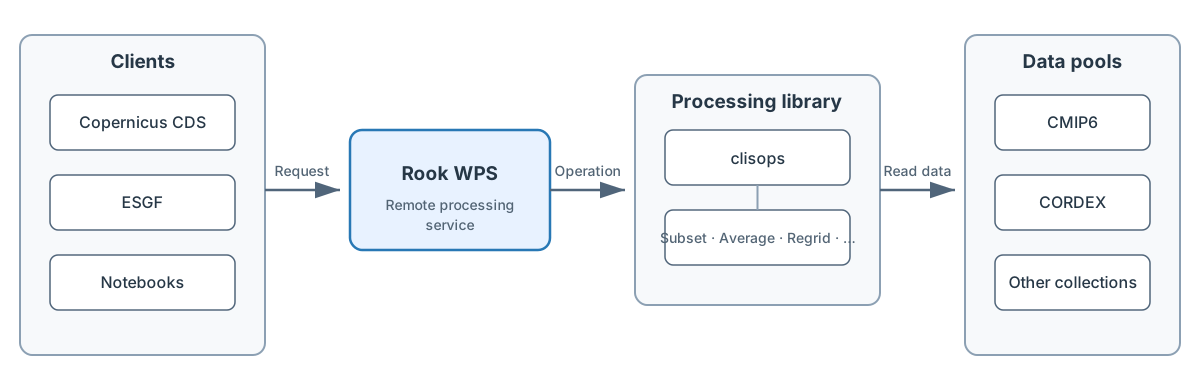
The diagram is maintained as Mermaid source.
The Milano 2026 presentation build
generates Reveal.js HTML and PDF from the canonical talk Markdown with
make -C docs/talks slides, independently of the Sphinx documentation.
Rook in a Minute
Get a local service running with the minimal setup:
$ git clone https://github.com/roocs/rook.git
$ cd rook
$ conda env create -f environment.yml
$ conda activate rook
$ make develop
$ make start
Then test the service endpoint in your browser:
http://localhost:5000/wps?service=WPS&version=1.0.0&request=GetCapabilities
Use make stop to stop the local service.
Health Check
Rook provides a lightweight synchronous WPS process for health monitoring:
/wps?service=WPS&version=1.0.0&request=Execute&identifier=health&RawDataOutput=status
A healthy response is plain text containing exactly ROOK_HEALTH_OK. Failed
checks omit that marker and return an OGC exception with a concise explanation.
Monitoring should therefore require an exact match of the success marker.
Optional filesystem checks select projects configured in roocs.ini:
[health]
projects = c3s-cordex, c3s-cmip6, c3s-cica-atlas
For each selected project, the health process takes its existing base_dir
and opens base_dir/.health-check.txt to read one byte. For example,
c3s-cordex checks the sentinel below [project:c3s-cordex]. This tests
actual read access to mounts such as Lustre without duplicating paths, loading
a dataset, or searching large directory trees. All selected projects must be
readable. Public failure messages use project names but do not expose
filesystem paths. With no projects configured, the process only checks that
the WPS handler can run.
Service Status
For operational detail, Rook also provides a synchronous status process.
Its versioned JSON report includes host and current WPS worker uptime, WPS
process counts, server load and memory, output-disk usage, configured filesystem
sentinels, and provider/contact identification from PyWPS [metadata:main]:
/wps?service=WPS&version=1.0.0&request=Execute&identifier=status&RawDataOutput=json
Request RawDataOutput=html for an HTML rendering of the same report.
Resource warning/failure percentages, stale-process age, and the per-check
timeout are configurable in the [status] section of roocs.ini. Failed
or timed-out checks are reported as red without blocking the remaining report.
Documentation
Learn more about Rook in its official documentation at https://rook-wps.readthedocs.io.
Submit bug reports, questions, and feature requests at https://github.com/roocs/rook/issues
Contributing
You can find information about contributing in our Developer Guide.
Use bump-my-version to release a new version.
Patch Release Quickstart
Prepare the release commit on a branch (example: 1.2.4):
$ edit CHANGELOG.rst
$ make conda-spec
$ bump-my-version bump --new-version 1.2.4 patch
$ git push
After the release commit has been merged, tag the exact commit on main:
$ git switch main
$ git pull --ff-only
$ git tag -a v1.2.4 -m "Release v1.2.4"
$ git push origin v1.2.4
What this does:
edit CHANGELOG.rstadds the release notes for the new patch version.make conda-specregeneratesconda-lock.ymlandlinux-64.spec.bump-my-versionupdates version metadata and creates the release commit; it deliberately does not create a tag.git pushpublishes the release branch for review and merge.The annotated tag is created manually from the merged
maincommit.
Tests
The tests folder includes additional tests for deployed Rook services.
Smoke test: ensure the service is operational. See tests/smoke/README.md.
Storm test: load-test using locust. See tests/storm/README.md.
License
Free software: Apache Software License 2.0
Documentation: https://rook-wps.readthedocs.io.
Credits
This package was created with Cookiecutter and the bird-house/cookiecutter-birdhouse project template.
Table of Contents
GitHub Repository
